I’ve been considering updating my main gaming related setup for quite some time but have had some issues with running a gaming PC as my main computer. I really like the mobility that comes from my current gaming laptop and the performance for everyday activity is more than enough. Everything runs smoothly and without hiccups and for this kind of usage I really don’t need to update my current setup. I only need extra gaming performance without changing to many things up. I’m so excited right now that I found a grate solution that I decided to write about it. So let’s see my reasoning and what solution I think will work best.
Contents
My current setup
My current setup is running a HP Envy6 with an upgraded SSD connected to an external display and external keyboard and mouse. For my daily computing needs it has held up well over the years and since I updated the SSD I haven’t really had a good reason other than gaming to upgrade it. The type of games I have been playing haven’t really taxed the built in Radeon HD7670, only very recent games have started causing problems. An update has become necessary if I want to keep playing newer games.
When I am at home I keep the laptop connected to the external display, sitting on a cooling pad and basically use it as a desktop. The thing that I like most about this setup is that I can just disconnect the HDMI-Cable and be off around the house or go to friends without much hassle. I always have everything I need with me and I like it this way. I can take the laptop to the kitchen and continue watching the video I was watching or the article I was reading while eating breakfast. If I feel tired and want to go to sleep I can always resume the movie I’m watching and watch it in bed without missing anything.
So I have been thinking of ways I could keep this mobility that I am enjoying so much, but still have the necessary horsepower to run the latest games at good FPS.
The obvious option – a gaming laptop
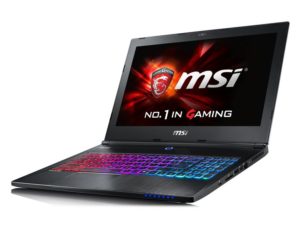
The first obvious solution would be to just buy the best gaming laptop I can find in my budget and basically have the best of both worlds. The problem with this solution is that laptops in general are underpowered compared to their desktop counterparts for a similar price. I can build a surprisingly potent Gaming-PC for less than 1500€. For the same budget you only get an entry level gaming laptop. Also let’s not forget that the laptop would be running in desktop mode over 80% of the time. I can also count on one hand the times I have played a game on battery. It isn’t pleasurable or last more than 1 hour.
The latest mobile graphics cards from nVidia have very similar performance to their desktop counterparts and have reignited this option in my mind. Having a very good gaming oriented laptop with a dedicated graphics card is probably the best solution for most people. In some aspects it’s a grate solution for me also, but gaming laptops tend to be such a compromise for everyday use. I think it’s a bit overkill for something that’s not really a desktop and not really a laptop. It’s more important for me to be able to run on battery for multiple hours on end than being able to game on a laptop. I think I have found different better solutions now.
Option 2 – a gaming PC with a KVM-switch
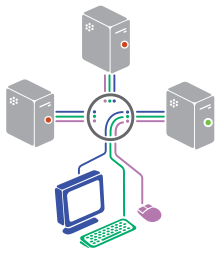
Considering that my current laptop is still holding up surprisingly well to my multimedia demands and is basically doing everything I need except gaming, I can build a separate gaming PC to be used just for gaming. The problem with this setup becomes quite obvious quite fast, you end up with having 2 displays, 2 keyboards and mice and basically everything twice. I could and probably would just use the gaming PC as my main PC, but I would have to restart everything every time I fire up the laptop and decide to be mobile.
The workaround I came up for this was using a KVM-switch. For the past month or so I’ve been researching various KVM models, how they work, how and what I can connect to one of these and so one. Basically I would be switching from one PC to the other by the flip of a switch. This works quite well in some environments but not always at home. There usually are problems with the keyboard and mouse resyncing when switching and such. Sometimes USB connected devices don’t work anymore, or don’t work the same way on both devices.
Seeing how this solution has more problems than expected, I eventually gave up on the KVM idea because it also seemed like a waste to have 2 PCs running at the same time just for the 2-3 hours I play a game and then it hit me.
Option 3 – a “headless” multimedia and gaming server
I realised that I need the gaming PC to “wake-up” in seconds only when I need it and not run all the time. Why not wake-up on lan? Wait, why not run games remotely? Can this work? and so I think I’ve found the perfect solution for my needs. After doing a few hours of research here’s what I learned:
Steam already has built-in in home streaming , everything would be running over LAN and lag would be minimal. Then I remembered that Linus built something similar with 8 gamers running on the same PC through the network, so it’s possible. I know that what he did there is over the top, but as a proof of concept it’s exactly what I’m looking for. This might just work!
The thing is, there are games that aren’t run through steam and the built-in remote desktop solution from Microsoft doesn’t really support high FPS and low latency. Other people have had the same idea and the solution for them has been Splashtop for personal use that can stream your desktop at 60FPS. It’s also a free solution for personal use, which I think gaming classifies as. There are other solutions out there, but Splashtop and Steam seem to be the only ones that offer high FPS support.
I’ve tried Splashtop to connect to my old laptop, it works grate. Even over wifi everything was running smoothly. Every now and then the sound would act up a bit, but the fps and everything else was grate. There are some limitations with games that don’t run over DirectX but for the most part it seems to be a good workaround.
Here’s a problem I would have forgotten if my research wouldn’t have been so thorough: A consumer versions of operating systems aren’t really designed to run without a display connected to them(also known as headless). This leads to them not starting up the graphics card at all and leading to very low resolutions when you connect to them remotely. This problem is it seems so ubiquitous that you can now get an adaptor on amazon that simulates a display. Basically what this does, is it tricks the OS into thinking there’s a 1080p display connected to it and it will then startup the graphics card and desktop at that resolution. Without it, it would just start a new session at 640×480 or something each time you connect to it. Not very good for gaming if you ask me. We’ve moved past Minecraft levels of detail for some years now.
For advanced functionality this same server can also serve as a NAS and backup server when I’m not gaming on it. Another advantage is that because all the high end processing is external, I can even use a much more basic client for the multimedia part of my needs.
The setup
Now let’s move on to how all this works together. This is just based on my research, when I end up actually building this setup I will post another post with the build process. Everything beyond this point is the ideal scenario. I think it’s pretty straight forward but there might be some problems I can’t foresee right now.
The client side
I will have one basic client computer. The one I’m still using for example that can satisfy all my multimedia and mobility needs. I could even upgrade to something newer without a dedicated graphics card at this point, even a tablet thanks to Splashtop. Everything I need to do on the client side is just have steam and Splashtop installed. Then I can sync everything with the server and game with only one click of the mouse in my steam library or connect via remote desktop. LAN Ping is usually well within 10ms so delay shouldn’t be an issue even over WiFi.
The server side
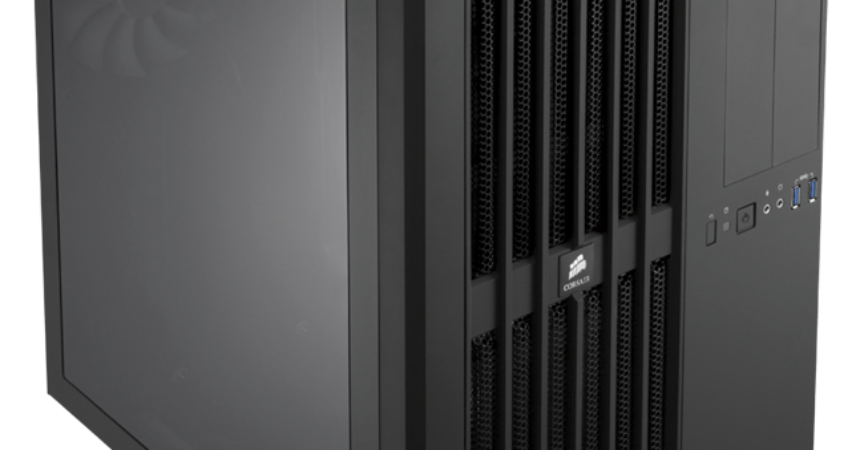
With my “basic user needs” met I can then build my purpose-built gaming-PC that I can place in some corner of my house, or in my storage room. Run a network cable to it and run it as a NAS/backup and gaming server without even hearing or noticing its presence. Because it isn’t meant to be seen by anybody I won’t spend extra on flashy RAM, LEDs and cases. I did a calculation a few weeks back when I was still contemplating the KVM idea and I can get a high end i5 with 16GB of RAM a GTX1070 and a big SSD for around 1200€.
On the server side there’s a bit more to do, but it’s pretty basic. Beyond the basic setup of a gaming PC it needs to:
- be setup in the BIOS to wake on lan, so it will start-up in a few seconds when you try to access it.
- be set to login automatically into Windows.
- be setup to automatically shutdown after 30min to 1 hour of inactivity.
- it has to have the display emulator plugged in so that it has a high resolution for the desktop environment.
- it has to be running the server-side Splashtop client.
- it has to have steam running at startup and logged in to the same account as on the client PC.
- the firewall rules need to be setup so there’s no connection issues.
- it’s a good idea to give it a static local network ip. Sometimes you might need to do some remote debugging.
- it’s a good idea to have a shared folder.
- (optional) setup various shared folders for content if you intend to also use it as a NAS
- (optional) setup a backup folder where back-ups of the client can be made regularly
- (optional) setup a redundancy RAID storage in case something goes wrong. HDDs are cheap, this is a no brainer.
- (optional) you can set it up to do updates and download your games over night when you don’t use bandwidth anyway.
I know I glazed over building and setting up the PC itself, but that’s an entire post in and of itself where I need to go into more detail. I will link back to it once I get to actually finish writing it.
How it all works
Once setup and tested, everything should run grate. On the client, you can start games directly from your steam library through in home streaming. If you have games that aren’t on steam, you can always connect remotely to the server with Splashtop and run them as you normally would on a regular computer. Remote desktop solutions always permit fullscreen mode. You can store all your media like movies, music, photos on the server and can access them from any of your devices in the house.
I just remembered, you can now stream your XBox games in Windows 10 by default. So we are basically taking this functionality to its next logical step with this setup.
I think this is turning out to be a very good solution for me and will keep you updated once I get it done.