As both Sony and Microsoft are struggling to offer their users the gaming experience they want and begrudgingly released a midlife update for their consoles, more and more people have started looking into gaming PCs to get the desired outcomes. I’m not trying to bash on consoles, because for their intended purpose and audience they have served brilliantly for many years, but recently as the technology has started seeing major improvements faster and faster, they have started to struggle to even keep up with user demands. So let’s start with PC gaming in general and see where we end up.
Video Gaming
The console years
Video gaming has for decades now been the favorite pastime of many people. Naturally every popular platform wanted a piece of that action and the PC was no exception. For quite a while gaming PCs couldn’t really handle real time rendering of games, thus the gaming console which was specifically built with only this purpose in mind became the go to technology.
Thankfully some very smart people were stubborn enough to not give up on gaming on PCs and built their own rendering engines that could let users play games on a PC.
For many years the gaming PC experience had lagged behind mainstream consoles and just as they would catch up and start exceeding performance, new and improved consoles would hit the market.
Right around the time of the PS2 and PS3 generation of consoles things started to shift drastically in favour of the PC. Newer and faster GPUs were being launched almost every year with substantial improvements over the previous generations all while consoles kept on going with their 8 to 10 year renewal intervals. If you’ve ever followed the gaming PC hardware world you would know that that’s forever in hardware time.
The shift
As I write this, both Sony and Microsoft have launched slightly improved versions of the PS4 and the XBox One that are capable of 4K video playback and have slightly faster processors. They are both running as close as makes no difference the same hardware from the same manufacturer with the same technology. We don’t yet know what the performance of these new consoles are, but we do know that the pre-update versions were running a slightly modified version of the ATI Radeon HD 7870 graphics card offering very similar performance.
As an effort to make gaming development easier and also to stay competitive with the PC both the Playstation and the XBox have moved over to PC hardware internals a few years back. They are effectively PCs built for one specific purpose and nothing else. We can say that just as before the consoles were competitive with gaming PCs on launch. The same can not be said 4 years later.
Gamers expectations
 As technology evolves and new games come out every year you can’t really expect for old hardware to be able to keep up with gamer expectations. As a work around to be able to run these newer games consoles use software wizardry to lower processing demands. This has lead in recent times to poor gaming experiences for everyone involved. We now have games locked at 30FPS or lower, games that could have been so much better being limited because the hardware can’t handle it or getting many many crashes and bugs because everything is running at the limit of what’s available. I’m not trying to bash consoles here, these aren’t snobberies these are facts. Because the available processing power is very limited you are limited in what you can and can’t do.
As consoles have started lagging behind gaming PCs many gamers have been looking for the better gaming experience and the only alternative has been the PC and here’s where the problem starts.
The owning experience
The plug-and-play nature of consoles
Consoles have the big advantage that they are plug and play. You plug them into your TV, which you already own, turn them on, and you are ready to go. There’s very little setup and installation hassle involved. Everything “just works” as Apple people like to point out all the time.
Consoles also have very simple game installation processes. You plug a disk in, or click Download on the interface and you’re off to the races.
The DIY nature of PC gaming
The same can not really be said about the gaming PC. Where depending on whether you build it yourself or buy pre-made you have to go through a few more steps and have to be somewhat familiar with the operating system to begin with.
You do have to sometimes install or update drivers for hardware components, you do sometimes have to play with settings to optimize your gaming performance and sometimes, very rarely, you do have to do debugging and fix some errors on your own. Consoles would just download the latest patch and be done with it.
The game installation process has become a whole lot easier over time and thanks to distribution platforms like steam you now do get the same one click install process just like consoles.
The best of both worlds
On the one hand you have people who like the plug-and-play experience that comes with consoles, but they would also like to have the power, performance and upgradeability of owning a gaming PC. On the other you have those that really don’t mind the difficulty and actually like to be more involved as long as at the end of the day they get the best gaming experience possible.
So the main question here is, and also the title of this article, “Should you buy a pre-made PC or build your own?”.
The basic PC
In truth both consoles and PCs have the same basic components that do the same basic things. The only differences is in the packaging and performance of said components and how much the user can or can not change or replace these components. Also the gaming PC has the big plus that it is backwards compatible and it can run previous gen games if you want to indulge some nostalgia.
Pre-built gaming PC
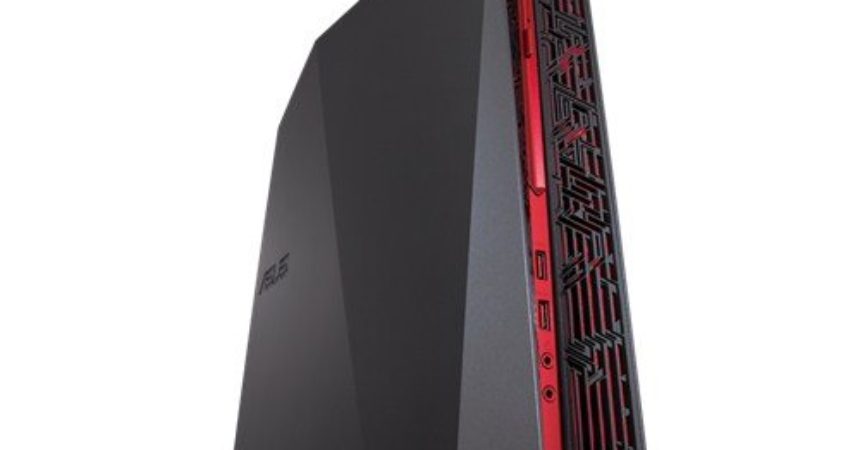
If you are just starting out or switching from a console and you really aren’t interested in figuring out which components fit to which and what the mix of them should be like it is a good idea to buy a pre-built gaming PC. These are generally very well balanced systems specifically designed for gaming and have the most plug-and-play experience you can get from a PC. They come with the operating system and drivers preinstalled and are ready to use right out of the box. You don’t have to do all this yourself, you get customer support if you run into problems and it is generally the solution with the least amount of hassle but also with the least amount of learning and experience required. Here’s a good example of one.
They come with a warranty and are pretested for bugs at the factory. If you do end up getting a bad component you can easily get the whole thing replaced.
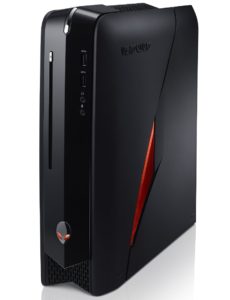
Alienware X51 compact gaming PC
Pre-built PCs have the disadvantage that they generally tend to have limited upgradeability and do sometimes have a lot of custom, non-standard components in them that can make servicing them later much more difficult. They also tend to have very compact packaging severely limiting how many components and upgrades can fit into them. This also makes working on them for an upgrade much more difficult. The Alienware X51 is a good example of what I’m talking about when I say compact gaming PC.
Most people think that these systems are expensive compared to building your own, but if you factor in the hours it takes to research, choose and install all the hardware, the time it takes to setup the OS and drivers, debugging and so on and multiply that time by a minimum hourly wage, you end up at a very similar price point.
I honestly recommend going pre-built for people not that interested in the hardware itself and just want to get the best experience with the least amount of hassle.
Building your own PC
A world of possibilities
If you want to learn how computer hardware works and want to make your unique vision of what a gaming PC is, then building a PC might be the way to go. Compared to ordering a pre-built gaming PC you get to choose every individual component that goes into your PC. The sky’s the limit here and you can spend as much as you are willing to pay.
While all this flexibility and variation is great, it inevitably leads to choice paralysis. There are so many things you can choose and look for that you can very easily get overwhelmed if you don’t have a plan and a general idea of what you want to do going in. There is no one best piece of hardware for everyone, it all depends on how you intend to use the machine and what type of games you play.
IT-Support training
Building your own gaming PC teaches you about the individual hardware components, but also how to debug them, how to setup an operating system, how to setup drivers, debug driver problems and so on. I would say building your own PC is a complete IT-support training for over 80% of the most common problems in the PC world.
Even though most components are lego like and don’t really fit in any other ports or sockets that aren’t designed for them, making errors can sometimes happen. Some components are somewhat similar. Some budget components and motherboards don’t always have built in fail safes for bad installations. But generally speaking the actual build process is very easy.
While the actual building of the PC case and plugging all of hardware in is very straight forward, the bios and software setup process isn’t. There are some steps you have to go through on first startup before you can actually install the operating system. Then there’s setting the entire operating system and drivers up. Then and only then can you actually install a game.
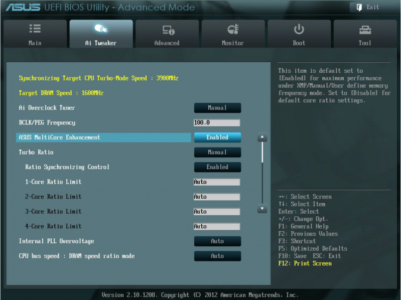
Example of ASUS UEFI BIOS
Most of these things come with experience, but having another device connected to the internet to read tutorials and troubleshoot is a great aid. “Back in my day” when a PC didn’t start I had to read through the motherboards manual and see if I maybe forgot something and debug it. If that didn’t work I would go to a friends houses to go online. I would research the problem and download other drivers and such. During this time I was effectively without a PC.
First time builders
For first time builders I highly recommend buying the gaming PC from a computer shop. Most shops offer free hardware setup if you buy all the components from them. Some of them will even offer a full setup with operating system and everything. This has the huge advantage that if you’re unlucky and get a defective part they will swap the part out with a good one before they deliver it to you.
Another big advantage to buying from a computer shop is that they can generally advise you. They will tell you if you made an incompatible components choice or forgot or missed something.
At the end of the day you end up with a gaming ready PC. If you want to learn how it all came together you can disassemble everything and put it back again. When it comes time to upgrade in a few years you will be ready.
Budget builds
The biggest advantage of all when it comes to building your own gaming PC is the budget aspect. You can, with very little exceptions, build a gaming PC with identical or better performance to a console for the same price. You don’t even have to believe me on this one, there are enough videos online proving this, so here’s an example:
You can start off by building a budget oriented machine and as you save up and have the cash you can upgrade it to be much more powerful over time. The Intel Core i3 fits the same socket as the i7, so you can start off with that, and upgrade at a later date to a much faster CPU. You can buy a motherboard with 4 RAM slots. Start by getting only 1 RAM kit at first, then get a second one at a later time. Something that not many people talk about or know is that the kits don’t have to be identical. Just the RAM modules in the slot pair have to be. You can have 2x2GB and 2x4GB installed for a total of 12 GB of RAM without problems.
Let’s not forget the second had component market. Other than harddrives,SSDs that get slow over time and cooling solutions with fans and fins getting clogged up, there are no other major components that can go bad under normal usage. If RAM is bad, it’s bad from the start and you have to replace it under warranty. CPUs are bad only if you tried to overclock it or didn’t install a fan correctly. The same is true about GPUs. I’m not going to sugger coat it, you can indeed sometimes find bad motherboards with some component gone bad, like the built in sound card, or one of the slots. If you buy the components from someone who has them in use at the moment of purchase there is no risk involved. You can talk to the seller and see if he has had any issues with said component in the past.
Conclusion
In conclusion the TL;DR version is:
- If you just want to start gaming on PC go buy a pre-built gaming PC
- If you don’t care about the hardwar itself and just want to game, go buy a pre-built gaming PC
- If you are technically inclined and want to learn how a PC works build your own PC
- If you have some experience with electronics it is a good idea to build your own PC
- If you want to squeeze out the most performance for your $ then build your own PC
Whatever your need is there is a solution to get your started in the PC gaming world and welcome to the Master Race.